$49.67
$83.45
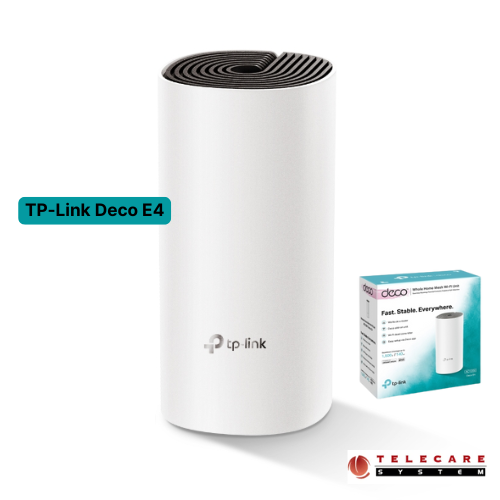
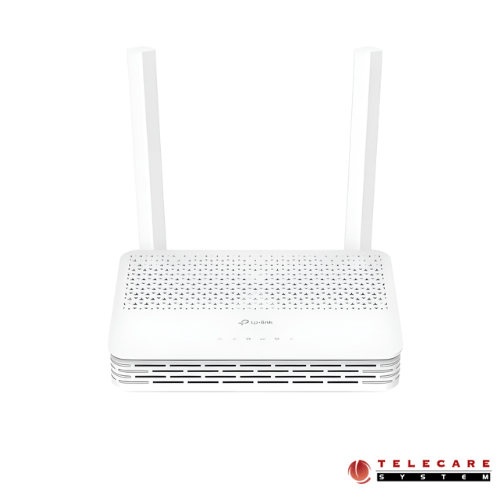
Description TP-Link Deco E4 Review: Complete Guide to Whole Home Mesh Wi-Fi System (AC1200) Are you tired of dealing with Wi-Fi dead zones in your home? Struggling with buffering videos or dropped connections when you move from room to room? The TP-Link Deco E4 mesh Wi-Fi system might be the solution you’ve been searching for. In this comprehensive review, we’ll explore everything you need to know about this affordable whole-home mesh networking solution. What is the TP-Link Deco E4? The TP-Link Deco E4 is an AC1200 dual-band whole home mesh Wi-Fi system designed to eliminate Wi-Fi dead zones and provide seamless internet coverage throughout your entire home. Unlike traditional routers that struggle to cover large areas, TP-Link Deco E4 uses multiple units working together to create a unified network with consistent coverage. This mesh system delivers combined speeds of up to 1167 Mbps (867 Mbps on 5 GHz and 300 Mbps on 2.4 GHz), making it suitable for everyday browsing, streaming, and smart home device connectivity. The system is available in 1-pack, 2-pack, and 3-pack configurations to match different home sizes and coverage needs. Key Features That Make TP-Link Deco E4 Stand Out Whole Home Coverage Without Dead Zones The Deco E4 two-pack delivers reliable Wi-Fi coverage to areas up to 2,800 square feet, while the three-pack extends this coverage even further. The beauty of mesh technology lies in its flexibility—if you need more coverage, simply add additional Deco units to your existing network. The units communicate with each other wirelessly or through optional Ethernet backhaul, creating a blanket of connectivity across your entire home. Read More Seamless Roaming Experience One of the most frustrating aspects of traditional Wi-Fi setups is the manual switching between networks as you move through your home. The Deco E4 solves this problem with TP-Link Mesh Technology. All Deco units work together to form one unified network with a single Wi-Fi name (SSID). Your devices automatically connect to the strongest signal as you move from room to room, ensuring uninterrupted connections for video calls, streaming, and gaming. Support for Up to 100 Devices Modern homes are filled with connected devices—smartphones, tablets, laptops, smart TVs, security cameras, smart speakers, and more. The Deco E4 is engineered to handle traffic from up to 100 devices simultaneously without compromising performance. This makes it ideal for families with multiple users and extensive smart home setups. The system uses dual-band technology and MU-MIMO (Multi-User, Multiple-Input, Multiple-Output) to distribute bandwidth efficiently across all connected devices, ensuring everyone gets the speed they need. Easy Setup and Management with Deco App Setting up a mesh network might sound complicated, but TP-Link has made it remarkably simple with the Deco app, available for both iOS and Android devices. The setup process takes just minutes: Connect your first Deco unit to your cable modem Download and launch the Deco app Follow the intuitive on-screen instructions The app handles the rest automatically Once set up, the Deco app becomes your central hub for network management. You can view all connected devices, run speed tests, set up guest networks, and access parental controls—all from your smartphone, whether you’re at home or away. Robust Parental Controls for Family Safety In today’s digital age, managing children’s online time and content is crucial. The Deco E4 includes comprehensive parental controls that are both powerful and easy to use: Create individual profiles for each family member with customized rules Set time limits and schedules for internet access Block inappropriate websites based on age-appropriateness with one-touch security settings Monitor which sites your children visit and how much time they spend online Pause internet access instantly for everyone during dinner or family time These features give parents peace of mind while allowing children to explore and learn online safely. Flexible Operating Modes TP-Link Deco E4 versatility extends beyond typical mesh systems with two operating modes: Router Mode (Default): Instantly creates a private wireless network, replacing your existing router entirely. This is ideal for most users and provides full mesh functionality. Access Point Mode: Transforms your existing wired network into a wireless mesh network. This mode is perfect if you already have a router you want to keep or if you’re in an apartment with internet service included. Performance and Compatibility TP-Link Deco E4 works seamlessly with major internet service providers and modems, making it a universally compatible solution. The dual-band AC1200 speeds are sufficient for most households’ daily activities: HD and Full HD video streaming on multiple devices Smooth web browsing and social media Video conferencing and online classes Smart home device connectivity Casual online gaming While it may not be the fastest option for power users who require 4K streaming on multiple devices simultaneously or competitive gaming, it offers excellent value for average households. Expandable Mesh Ecosystem One of the smartest aspects of investing in TP-Link Deco E4 is its compatibility with other Deco models. If your needs grow or you want to upgrade certain areas of your network, you can mix and match different Deco units. The system works together seamlessly, allowing you to build a customized mesh network that evolves with your needs. Security Features Network security is built into the Deco E4 with SPI firewall protection and WPA2-Personal encryption. While it doesn’t include the advanced antivirus features available in higher-end Deco models like the M9 Plus or M5, it provides solid basic security for most home networks. The access control features let you block specific devices if needed, adding another layer of protection. TP-Link Deco E4 Specification Key Features Data Rate 300 Mbps on 2.4 GHz 867 Mbps on 5 GHz Antenna 2 internal dual-band antennas per Deco unit Button 1 Reset button on the underside Frequency 2.4 GHz and 5 GHz Wireless Yes Interface 2 Internal dual-band antennas per Deco unit Network Standard IEEE 802.11 ac/n/a 5GHz, 300 Mbps at 2.4 GHz Encryption WPA-PSK/WPA2-PSK Ports 2 10/100Mbps, WAN/LAN Ports, 1 Power Port Operating System Support iOS 9.0 or later Android 4.3 or later Power Source Power Mode AC adapter input : 100-240V/50-60Hz 0.3A AC adapter output : 12 ⎓ 1A Transmit Power : FCC: <30 dBm CE: <20 dBm (2.4 GHz) <23 dBm (5 GHz) Physical Dimension Dimension 7.5 x 3.6 x 3.6 in (190.5 x 90.7 x 90.7 mm) Color White Manufacturer warranty Warranty 01 Year warranty Who Should Buy the TP-Link Deco E4? TP-Link Deco E4 is an excellent choice for: Families living in medium to large homes (2,000-4,000 square feet) Households with multiple internet users and smart home devices Parents wanting effective parental controls without complexity Anyone experiencing Wi-Fi dead zones with their current router Budget-conscious buyers seeking reliable mesh Wi-Fi without premium pricing First-time mesh network users looking for easy setup TP-Link Deco E4 delivers exceptional value in the mesh Wi-Fi market. While it may not offer the blazing speeds of premium mesh systems, it provides reliable, seamless whole-home coverage at an accessible price point. The intuitive setup process, comprehensive parental controls, and ability to handle up to 100 devices make it a practical solution for most families. If you’re struggling with Wi-Fi coverage issues, frequent disconnections, or simply want to upgrade to a more modern networking solution, the Deco E4 deserves serious consideration. Its combination of ease of use, reliable performance, and expandability creates a future-proof foundation for your home network. TP-Link Archer AX53 Dual Band Gigabit Wi-Fi Router
Router